Trace the transactions of an AI SDK agent
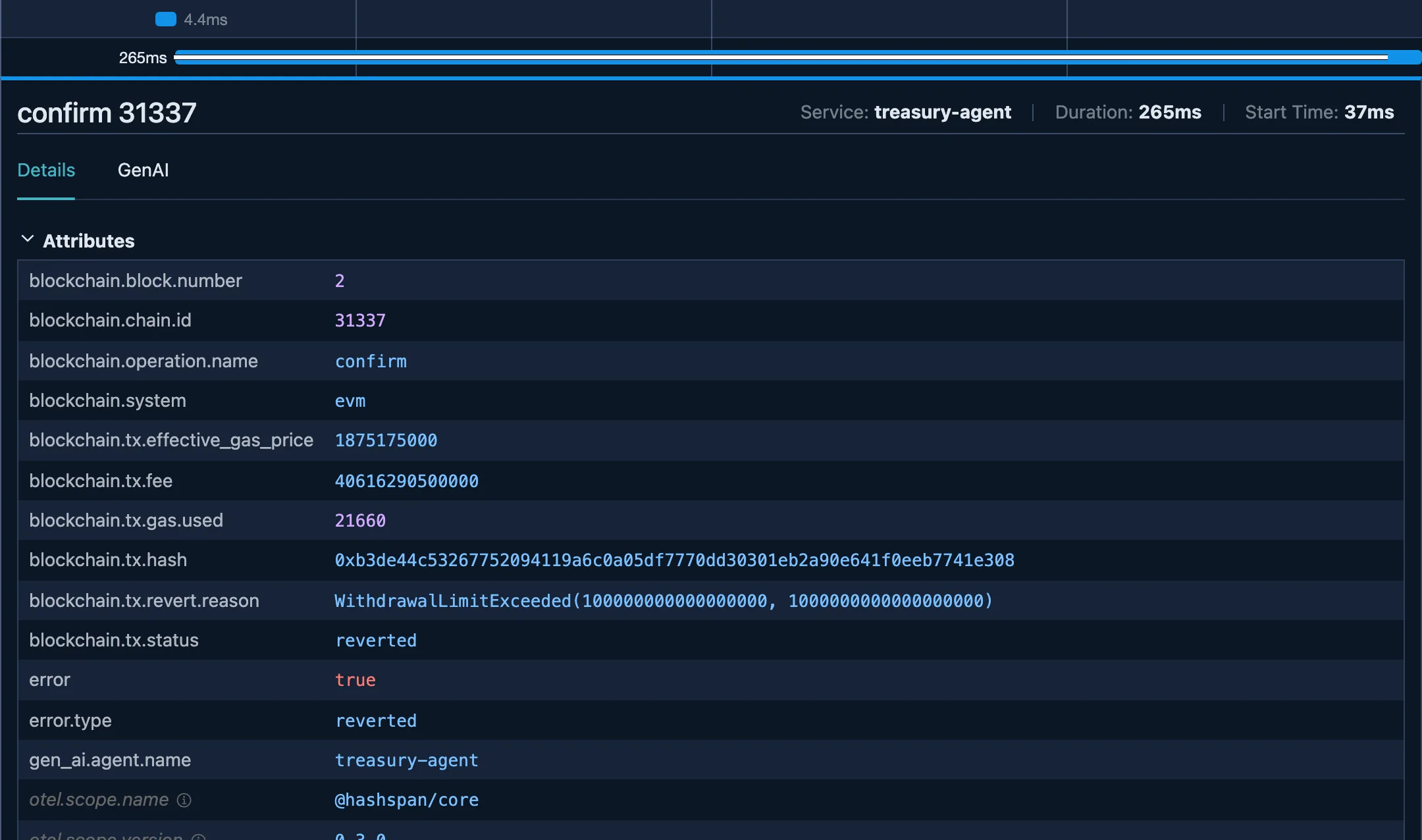
The AI SDK’s OpenTelemetry integration records every tool call. In the run below, the withdrawal reverted on chain, and execute_tool withdraw_from_vault still has no error on it. The tool returned normally: a reverted receipt is a value, not an exception.
hashspan adds what happened to the transaction, as child spans of the tool that sent it:
invoke_agent <model>├─ step 1│ ├─ chat <model>│ └─ execute_tool pay_vendor│ ├─ send 31337│ └─ confirm 31337│ blockchain.tx.status=success└─ step 2 ├─ chat <model> └─ execute_tool withdraw_from_vault (no error) ├─ send 31337 └─ confirm 31337 ✕ error blockchain.tx.status=reverted blockchain.tx.revert.reason=WithdrawalLimitExceeded(…)The withdrawal tool sets its own gas limit, so the transaction is mined and reverts on chain. Without one, viem’s gas estimate fails before sending: the send span records the error and the tool span is marked as an error too.
This page sets that up with AI SDK 7 (ai 7, @ai-sdk/otel 1) and viem. You need Node.js 22.3 or later.
Set it up
Section titled “Set it up”-
Install the packages
Section titled “Install the packages”Terminal window npm install ai @ai-sdk/otel @hashspan/viem viem zod \@opentelemetry/api \@opentelemetry/sdk-trace-node \@opentelemetry/sdk-trace-base \@opentelemetry/exporter-trace-otlp-proto \@opentelemetry/resources \@opentelemetry/semantic-conventionsAdd the package for your model provider too, such as
@ai-sdk/openai. -
Register one tracer provider for both
Section titled “Register one tracer provider for both”The AI SDK and hashspan both use the global OpenTelemetry API, so one provider receives the agent’s spans and the transaction spans:
telemetry.ts import { OpenTelemetry } from '@ai-sdk/otel';import { OTLPTraceExporter } from'@opentelemetry/exporter-trace-otlp-proto';import { resourceFromAttributes } from '@opentelemetry/resources';import { BatchSpanProcessor } from '@opentelemetry/sdk-trace-base';import { NodeTracerProvider } from '@opentelemetry/sdk-trace-node';import { ATTR_SERVICE_NAME } from'@opentelemetry/semantic-conventions';import { registerTelemetry } from 'ai';export const provider = new NodeTracerProvider({resource: resourceFromAttributes({[ATTR_SERVICE_NAME]: 'treasury-agent',}),// OTLPTraceExporter honours OTEL_EXPORTER_OTLP_ENDPOINTspanProcessors: [new BatchSpanProcessor(new OTLPTraceExporter())],});provider.register();// The AI SDK's spans (invoke_agent, execute_tool, ...)// go through the same provider.registerTelemetry(new OpenTelemetry()); -
Send from extended viem clients in your tools
Section titled “Send from extended viem clients in your tools”Extend the clients your tools send with. The tools need no tracing code: the AI SDK runs each tool inside its
execute_toolspan, and hashspan starts its spans in whatever span is active.tools.ts import { withHashspan } from '@hashspan/viem';import { tool } from 'ai';import { createPublicClient, createWalletClient, http, parseEther } from'viem';import { baseSepolia } from 'viem/chains';import { z } from 'zod';// One result for every client of this agent,// so confirm spans link to their sends.export const hashspan = withHashspan({agent: { name: 'treasury-agent' },});const chain = baseSepolia;// account: any viem Account, such as// privateKeyToAccount(key, { nonceManager })const wallet = createWalletClient({ account, chain, transport: http() }).extend(hashspan);const reader = createPublicClient({ chain, transport: http() }).extend(hashspan);const vendor = '0x70997970C51812dc3A010C7d01b50e0d17dc79C8';export const tools = {pay_vendor: tool({description: 'Pay the vendor an amount of ETH.',inputSchema: z.object({ amountEth: z.string() }),execute: async ({ amountEth }) => {const hash = await wallet.sendTransaction({to: vendor,value: parseEther(amountEth),});const receipt = await reader.waitForTransactionReceipt({ hash });// Tell the model when it reverted.return { hash, status: receipt.status };},}),}; -
Run the agent, then flush
Section titled “Run the agent, then flush”Import
telemetry.tsfirst. A confirm span can end after the agent returns, for example while a revert reason is decoded, so a script flushes before it exits. A long-running server doesn’t needflush(); call it only on shutdown.agent.ts import { provider } from './telemetry.js';import { stepCountIs, ToolLoopAgent } from 'ai';import { hashspan, tools } from './tools.js';const agent = new ToolLoopAgent({model, // any AI SDK model// becomes gen_ai.agent.name on the invoke_agent spantelemetry: { functionId: 'treasury-agent' },instructions: 'You manage a small treasury.',tools,stopWhen: stepCountIs(5),});await agent.generate({ prompt: 'Pay the vendor 0.01 ETH.' });await hashspan.flush();await provider.shutdown();generateTextandstreamTextwithtoolsgive the same tree.
Open your tracing backend and expand a tool span. No backend yet? docker run --rm -p 16686:16686 -p 4318:4318 jaegertracing/jaeger:2.21.0 starts Jaeger on localhost:16686. Other backends are on Backends.
Two tool calls in one step can share a nonce
Section titled “Two tool calls in one step can share a nonce”A model can ask for several tools in one step, and the AI SDK runs them at the same time. If two of them send from the same account, viem can read the same nonce for both. On a local Anvil chain, one of the two sends failed:
execute_tool pay_vendor ✕└─ send 31337 ✕ error.type=TransactionExecutionErrorexecute_tool withdraw_from_vault├─ send 31337└─ confirm 31337Give the account viem’s nonce manager, which hands out nonces in order within the process:
import { nonceManager, privateKeyToAccount } from 'viem/accounts';
const key = process.env.PRIVATE_KEY as `0x${string}`;const account = privateKeyToAccount(key, { nonceManager });
With it, both transactions in that run were mined.
Tools that return before the receipt
Section titled “Tools that return before the receipt”A tool that returns the hash right away, so the model can move on, never waits for a receipt. Background confirmation records the confirm span anyway, still under that tool’s span:
export const hashspan = withHashspan({  agent: { name: 'treasury-agent' },  confirm: { mode: 'background' },});
// in the tool:execute: async ({ amountEth }) => ({  hash: await wallet.sendTransaction({    to: vendor,    value: parseEther(amountEth),  }),}),
hashspan.flush() before exit waits for those background confirmations too. Timeouts and polling are covered in background confirmation.
Name the agent on the transaction spans
Section titled “Name the agent on the transaction spans”functionId sets gen_ai.agent.name on the AI SDK’s invoke_agent span. It does not reach hashspan’s spans. Set the same name in hashspan’s agent option, as in tools.ts above, and every send and confirm span carries gen_ai.agent.name. Your backend can then find one agent’s reverted transactions with a single attribute search, without joining spans.
Using LegacyOpenTelemetry?
Section titled “Using LegacyOpenTelemetry?”With registerTelemetry(new LegacyOpenTelemetry()), the AI SDK names its spans ai.generateText and ai.toolCall instead. hashspan’s spans nest under ai.toolCall the same way. AI SDK 6 and its experimental_telemetry option have not been checked with hashspan.
- A runnable AI SDK agent that pays a vendor and hits a reverting vault, with no API key: examples/ai-sdk-agent on GitHub, or run it in the local lab.
- Every option of
withHashspan(): viem adapter. - Sending the trace to Langfuse, Grafana Tempo or Honeycomb: Backends.