The OpenTelemetry GenAI semantic conventions name the spans an AI agent produces: invoke_agent for the run, chat for each model call, execute_tool for each tool. Every span also gets standard gen_ai.* attributes, so any backend can read an agent’s trace.
That’s the definition. Below is what it looks like on a real run, and the one place where the conventions stop.
TL;DR
- Three operations cover most agent traces:
invoke_agent,chatandexecute_tool. Thegen_ai.*names are still in Development.gen_ai.tool.call.idjoins the model’s tool request, the tool span and the next model call.- Message content should be opt-in. The AI SDK records it by default, so check yours.
What are they, and where do they stand in 2026?
Semantic conventions are shared names. If every library calls a model call chat and puts the model in gen_ai.request.model, one dashboard works for all of them.
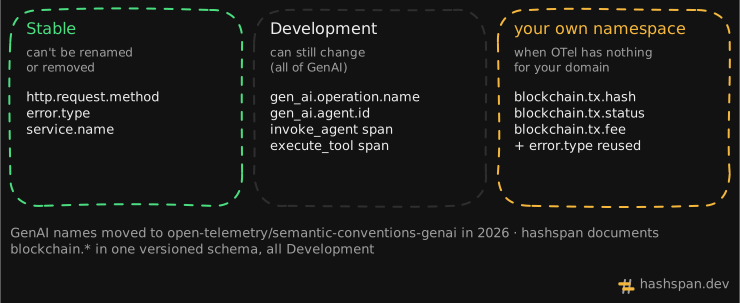
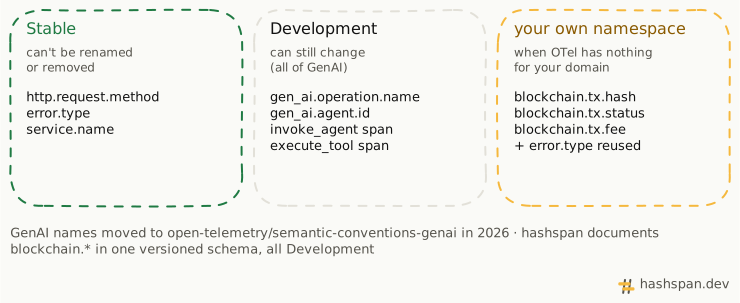
The GenAI set has lived in its own repository, open-telemetry/semantic-conventions-genai, since May 2026. Every page in it is marked Development, so the gen_ai.* names can still change. Shared attributes such as error.type come from the stable core conventions. The repository has no releases, so this post pins the commit it was checked against: e07f4eb, 2 October 2026.
Which spans does an agent run produce?
I ran the example agent from the hashspan repository. It’s built with the AI SDK and has two tools: pay_vendor and withdraw_from_vault. A scripted model makes the tool calls, so it runs offline. These are the GenAI spans it exported (hashspan’s own spans come in the last section):
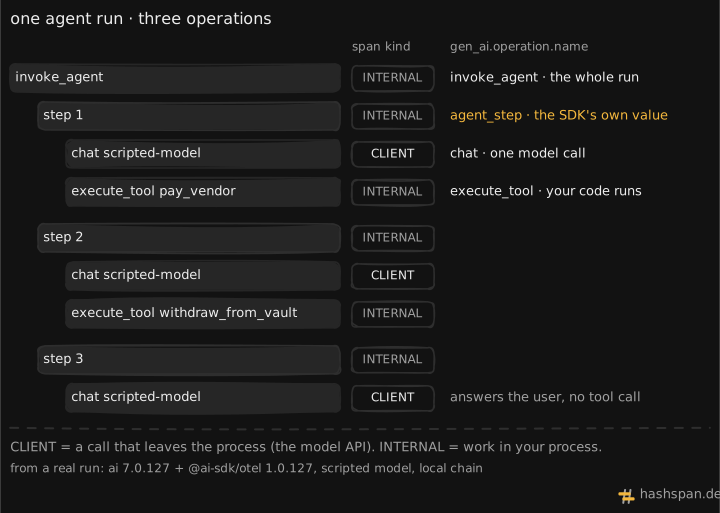
Three things to notice:
- The span kind follows where the work happens.
chatisCLIENTbecause it calls a model API.execute_toolisINTERNALbecause your code runs it.invoke_agenthas two variants in the spec:CLIENTfor a remote agent service,INTERNALfor an agent in your process, like this one. step Nisn’t in the conventions. The AI SDK adds it withgen_ai.operation.name=agent_step. That’s allowed: when no well-known value fits, a library may use its own.- The root span is named
invoke_agent scripted-model. The spec saysinvoke_agent {gen_ai.agent.name}, which would beinvoke_agent treasury-agent. It’s a SHOULD, not a MUST, but it means a query on span names won’t find this agent by its name. Filter on thegen_ai.agent.nameattribute instead.
Here are the same spans laid out in time:
Which attributes matter in practice?
The spec lists dozens. These are the ones you’ll query. All of them except error.type were set in the run; “If available” and “If it failed” are the spec’s Conditionally Required.
| Attribute · span | Level |
|---|---|
gen_ai.operation.name · all three |
Required |
gen_ai.provider.name · chat |
Required |
gen_ai.request.model · chat |
If available |
gen_ai.usage.*_tokens · chat |
Recommended |
gen_ai.agent.name · invoke_agent |
If available |
gen_ai.tool.name · execute_tool |
Required |
gen_ai.tool.call.id · execute_tool |
Recommended |
error.type · any |
If it failed |
Attributes like these are what make “tokens per model” or “slowest tool” a one-line query in your backend.
The attribute I’d query first is gen_ai.tool.call.id. The model asks for a tool by id, the tool span records the same id, and the result goes back to the model with it:
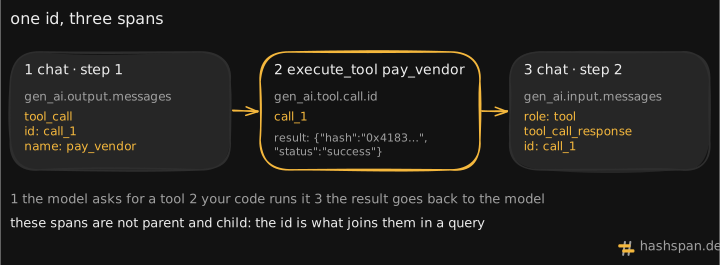
When an agent calls the same tool twice in one step, the id is what tells the two results apart.
What does the AI SDK record by default?
The conventions are careful with content. Prompts, messages and tool results are sensitive and large. The spec says instrumentations SHOULD NOT capture them by default, and describes three patterns:
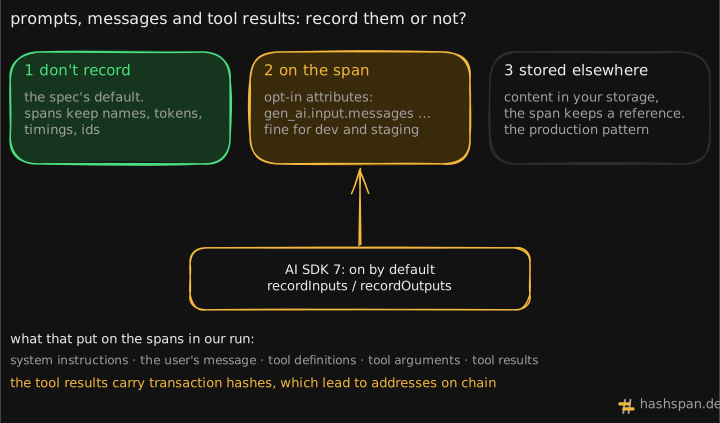
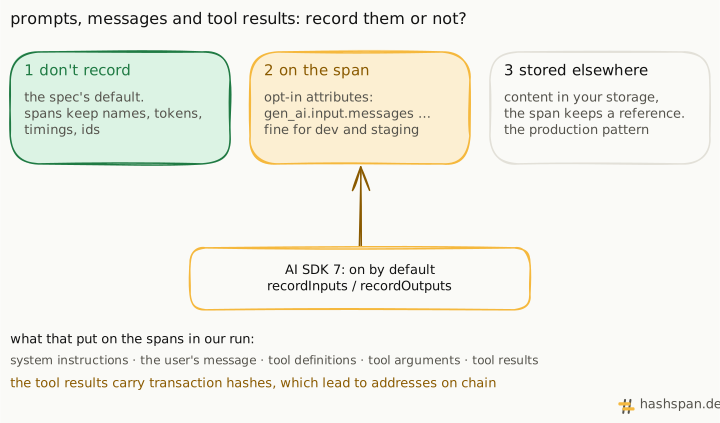
The AI SDK takes the second pattern unless you say otherwise: recordInputs and recordOutputs are both on by default. The example sets neither, and its spans carried the system prompt, the user’s message, the tool definitions, the tool arguments and the tool results.
For an agent that moves money, the tool results contain transaction hashes. Turn recording off where that matters:
const agent = new ToolLoopAgent({ // …model, tools telemetry: { functionId: 'treasury-agent', recordInputs: false, recordOutputs: false, },});I reran the example with this change. The messages, instructions, tool definitions, arguments and results were gone; span names, gen_ai.tool.call.id and token counts stayed.
One more addition is worth knowing about. Since 30 September there’s a gen_ai.main_agent entity: a resource that names the top-level agent of a process. It needs a stable id from a provider, like a Bedrock agent ARN. The spec forbids generating one in memory, so a local agent like this one doesn’t emit it. That’s by design.
Where do the conventions stop?
The withdrawal in this run reverted on chain. Here’s how the trace answers “did it work?”:
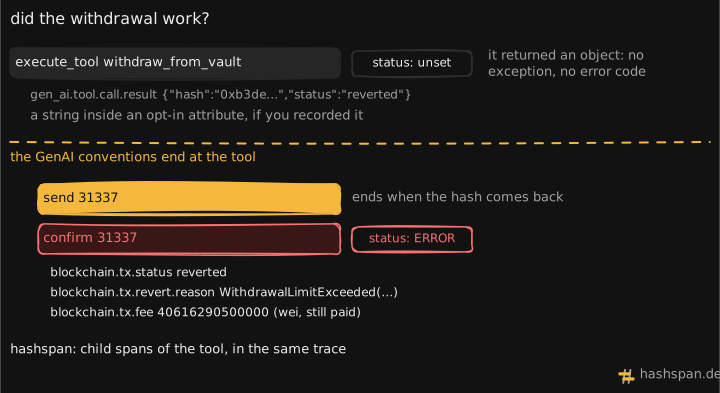
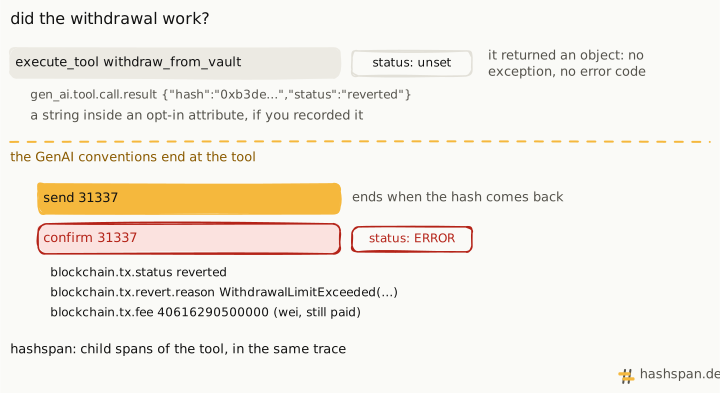
The tool span stays clean, and the instrumentation can’t do better. OpenTelemetry’s error rules count an operation as failed when it throws or returns an error code. The tool did neither: it returned an object, and the AI SDK has no way to know that "status": "reverted" inside it means the withdrawal never happened. The conventions describe the agent’s side of the call. What the call did out in the world is outside their scope.
That’s the gap hashspan fills for on-chain tools. It adds send and confirm as child spans of execute_tool, with names from its own semantic conventions:
- blockchain.tx.status
- reverted
- blockchain.tx.revert.reason
- WithdrawalLimitExceeded(100000000000000000, 1000000000000000000)
- blockchain.tx.fee
- 40,616,290,500,000
- gen_ai.agent.name
- treasury-agent
Note the last row. hashspan writes the agent’s gen_ai.agent.name on its own spans too, so “which agent spent what” doesn’t need a join. The full story of why the trace used to stop at the tool is in Your agent’s trace stops at the tool call.
Run it yourself
The run needs no API key. In a clone of the repository, with Docker running and Node.js 22.18 or later (see the local lab):
make lab-up # Jaeger on http://localhost:16686make demo # the agent, a local chain, both transactionsTo wire the same thing into your own AI SDK agent, follow the AI SDK recipe. The GenAI conventions will keep moving while they’re in Development. I’ll update this post when they do.

Discussion
Comments live in GitHub Discussions. Sign in with GitHub to join.