Nonce too high: cause and fix

Rejected before the chain. The node refuses it: no transaction hash, no receipt.

3 min read· Updated · Reproduced View as MarkdownOpen in ClaudeOpen in ChatGPT

Short answer

Every account's transactions must use nonces in order, starting from the account's next one. Nonce too high means yours skips ahead: earlier nonces were never sent. Some nodes refuse it, as Hardhat does while automining. Others accept it and keep it queued until the missing nonces arrive. Don't set the nonce by hand: let the client read the next one from the node, or send the missing nonces first.

What you will see

Messages printed for it:

  • nonce too high
  • Nonce too high. Expected nonce to be 0 but got 5. Note that transactions can't be queued when automining.
  • Nonce provided for the transaction (5) is higher than the next one expected.
On this page

Where does it stop?

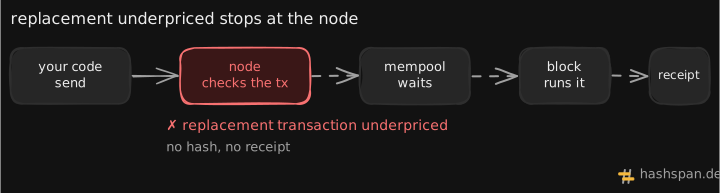
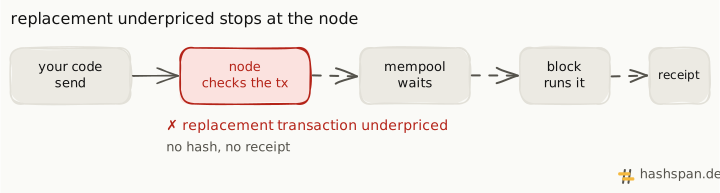
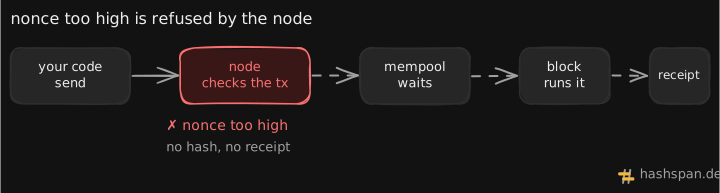
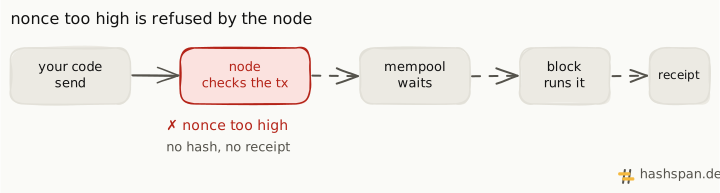
A transaction's path from your code to the node, the mempool, a block and a receipt. The node's check is marked in red with the error nonce too high, and the later steps are dashed: no hash and no receipt.A transaction's path from your code to the node, the mempool, a block and a receipt. The node's check is marked in red with the error nonce too high, and the later steps are dashed: no hash and no receipt.

The node compares your nonce with the account’s next one before it accepts the transaction. If yours is higher, a node that refuses gaps sends it back at once: no hash, no block, no gas spent.

What does the node check?

A nonce counts the transactions an account has sent, and each one can be used once, in order. geth names this error for a nonce “higher than the next one expected based on the local chain” (core/error.go).

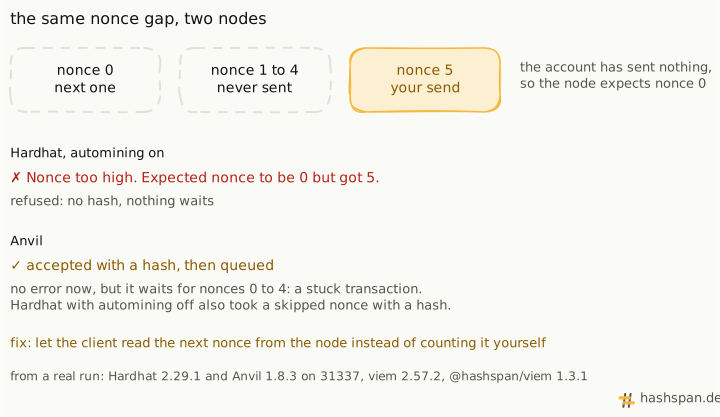
What a node does with a gap differs. In our run, the same send had two outcomes:
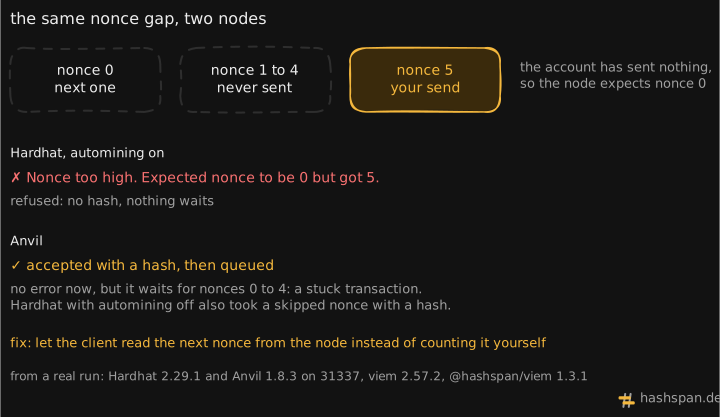
A fresh account expects nonce 0; nonces 1 to 4 were never sent, and the send uses nonce 5. Hardhat with automining on refuses it with Nonce too high, expected nonce to be 0 but got 5: no hash. Anvil accepts it with a hash and queues it, so it waits for nonces 0 to 4. Hardhat with automining off also accepted a skipped nonce with a hash. The fix: let the client read the next nonce from the node.A fresh account expects nonce 0; nonces 1 to 4 were never sent, and the send uses nonce 5. Hardhat with automining on refuses it with Nonce too high, expected nonce to be 0 but got 5: no hash. Anvil accepts it with a hash and queues it, so it waits for nonces 0 to 4. Hardhat with automining off also accepted a skipped nonce with a hash. The fix: let the client read the next nonce from the node.

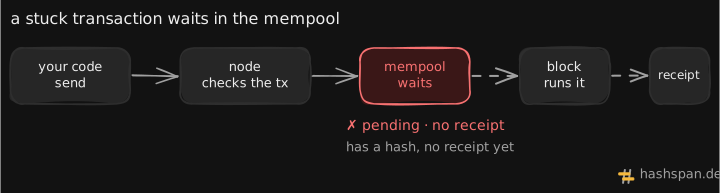
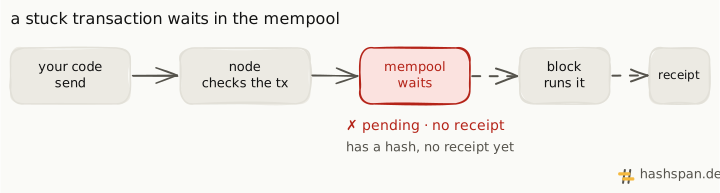
A node that queues the gap gives no error now. The transaction waits instead, and you see it as a transaction stuck pending.

Why does it happen?

  • The nonce is set by hand. Code passes a nonce it computed itself, and the count is ahead of the chain.
  • The chain was reset. A local node restarted from an empty chain, but a script or wallet kept its old count.
  • Earlier sends failed. Code that counts nonces moved on, but the transactions for the skipped nonces never reached the node.

How do I fix it?

  1. Read the next nonce from the node. With a pending block tag, the count includes transactions already waiting in the pool for the next blocks.
  2. Leave nonce out. viem then asks the node for it before it sends. In our run, the same account sent fine once the nonce was left out.
  3. Or send the missing nonces first. If the skipped transactions still matter, send them in order. The later one can follow.
  4. In an agent, keep one nonce source per account, such as viem’s nonceManager, so parallel tool calls don’t count on their own. In our run, parallel sends that shared a count failed the other way, as nonce too low. That run shows what a manager fixes and what it doesn’t.
import type { Address, PublicClient } from 'viem';
declare const client: PublicClient;
declare const address: Address;
declare const myNonce: number; // the nonce your code was about to use
const next = await client.getTransactionCount({ address, blockTag: 'pending' });
if (myNonce > next) console.log(`nonce too high: the node expects ${next}, you have ${myNonce}`);

What does it look like in a trace?

Like every refusal by the node, it is a send span that ends with an error and no hash:

send 31337error
error.type
NonceTooHighError
blockchain.tx.nonce
5
exception.message
Nonce provided for the transaction (5) is higher than the next one expected.
blockchain.tx.hash
not set
From the Hardhat run above. exception.message appears only with errorMessages set to sanitized.

The span records the nonce you sent, so compare it with the account’s count at that time. A gap the node queued shows differently: the send succeeds and the confirm span times out.
How this page was checked. Reproduced on a local Hardhat 2.29.1 node (31337, automining on) with viem 2.57.2 and @hashspan/viem 1.3.1 on 2026-10-21: a fresh account whose next nonce was 0 sent nonce 5 and was refused. The same send to Anvil 1.8.3 got a hash and was queued. The last line above is viem's message for the error.

Something wrong or out of date? Report a problem with this page.

FAQ

Does nonce too high cost gas?

No. The node refuses the transaction before it reaches a block: no hash, no receipt, no fee.

Why does Anvil not show this error?

In our run, Anvil accepted nonce 5 for a fresh account and kept it as queued. Hardhat with automining off also accepted a skipped nonce with a hash. The transaction then waits for the missing nonces, and the trouble shows up later as a transaction stuck pending.

I restarted my local node and now get nonce too high. Why?

A restart can reset the chain, so every account's nonce starts again at 0. Anything that kept its own count, such as a script or a wallet, now sends a nonce the new chain hasn't reached. Reset that count, or let the client read the nonce from the node.

What is the difference between nonce too high and nonce too low?

Too low means the nonce was already used, so the transaction can never run. Too high means it skips ahead: it can run only after the missing nonces are sent.

See it in your own trace

Type to search the docs, Learn topics and the blog.